How to register with 1xBet in Qatar
The 1xBet registration form and available methods can vary by device and account location. Check each item below before you submit the form.
TBBT is case-insensitive. The referral link has not been verified to fill the code automatically, so check the field yourself. Account creation, identity verification and bonus activation are separate steps.
- Open the registration form using the player link. Choose a registration method offered on your screen, and use contact details you control.
- Select your actual country and review the available currency. Check for QAR if you want the Qatar offer described here; do not select a false country to make a form work.
- Fill in the required fields accurately. Enter TBBT in the promo code field before submitting the registration.
- Choose the sports bonus if you want the sports offer described in this guide. Read the displayed conditions before accepting; the casino package has separate rules.
- Review your details and submit the form only if you meet the displayed eligibility requirements. Keep your login details private.
- Complete the requested profile and phone activation steps in My Account. Before any deposit, check the bonus shown, the currency and the payment-method minimum.
Choose sports or casino at registration
For the TBBT sports offer up to QAR 585, select sports. The casino welcome package is a separate choice with its own deposit minimums, wagering and deadline.
Sports bonus
100% up to QAR 585With TBBT · First deposit from QAR 4 · 5× bonus wagering · 30 days from registration.
Bonus termsCasino bonus
Up to QAR 5,880 + 150 FSFirst deposit: 100% up to QAR 1,175 + 30 FS, from QAR 40. 35× wagering within 7 days; QAR 20 maximum stake.
Casino package detailsChoose a bonus type at registration. These packages cannot be combined; receiving the opposite bonus after switching can remove eligibility for later casino stages.
Follow the Qatar mobile form
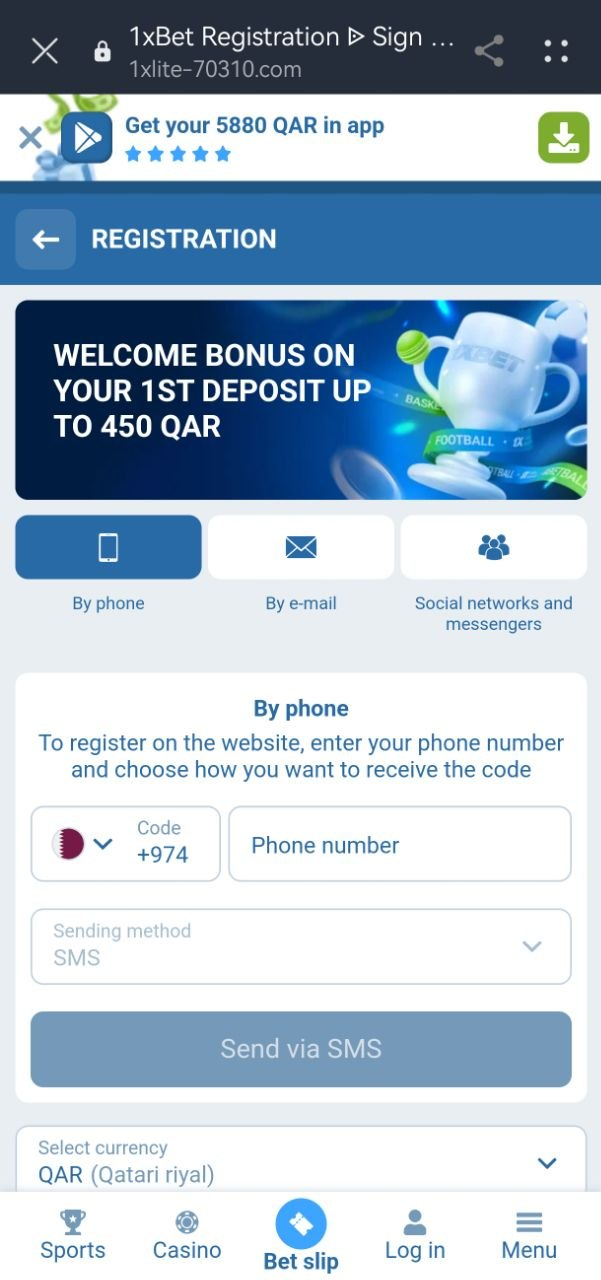
The first screenshot shows phone registration with Qatar’s +974 code and SMS selected. Check your number and follow the form’s send-code and verification prompts. E-mail and other methods may also be offered.
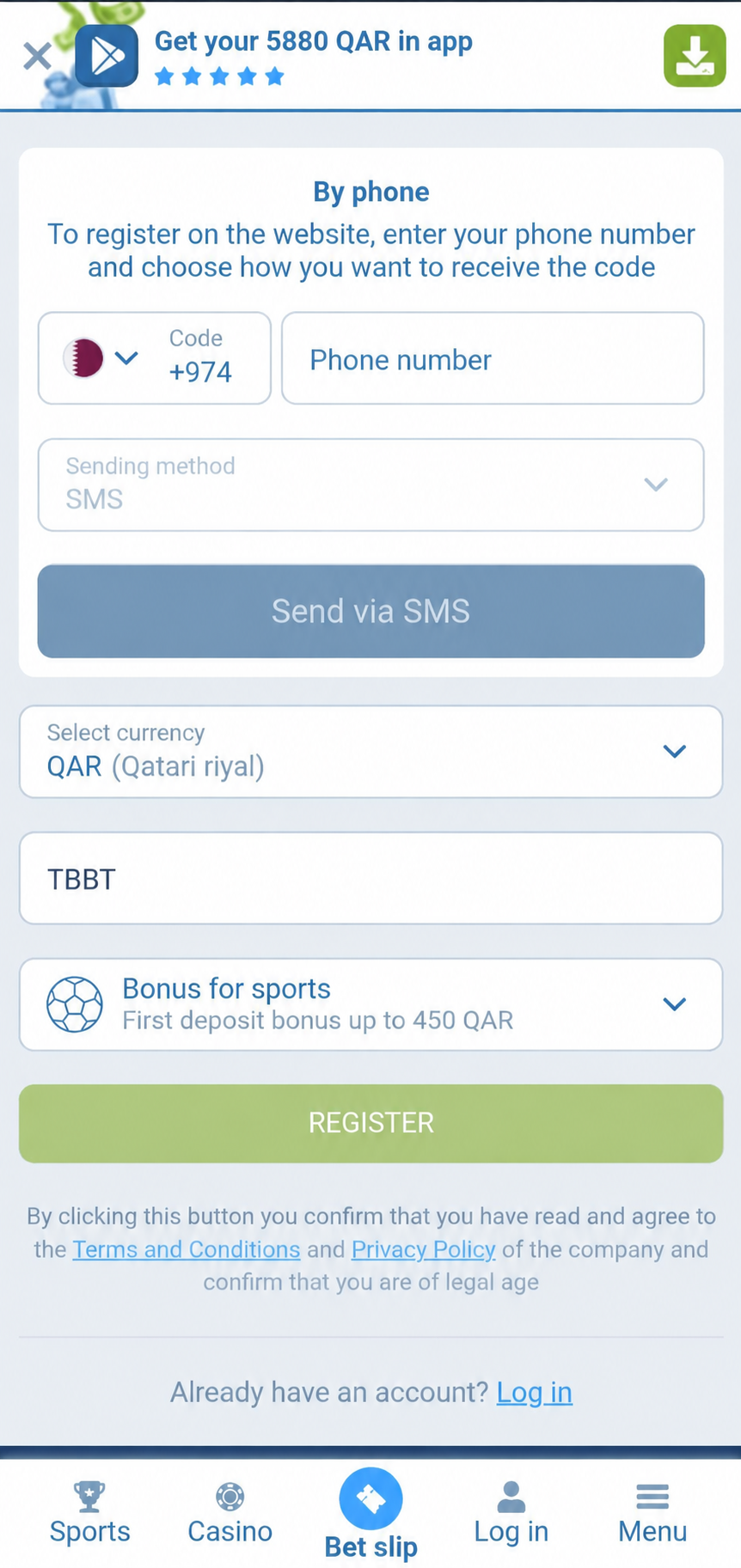
Below the phone area are the QAR currency selector, promo-code field and bonus selector above REGISTER. Enter TBBT before completing registration. Check the Bonus for sports selection if you want the sports welcome offer described in this guide. Review the form before tapping REGISTER.
TBBT has been added to the second image as an example. The screenshot still displays the standard QAR 450 sports cap; it is not evidence that the code was accepted or the QAR 585 cap activated.
Prepare the account for the sports bonus
In My Account, fill in all required personal information and activate your phone number. Confirm that sports betting bonuses are enabled before depositing.
TBBT increases the maximum eligible sports welcome bonus from QAR 450 to QAR 585. The match remains 100%. The offer minimum is QAR 4; payment-method minimums can differ.
Identity verification and account ownership
The supplied offer terms allow the operator to request identity documents, a photo holding ID or telephone verification. Provide such information only through the operator’s own secure verification process.
HostDoha does not create accounts, collect identity documents or resolve account ownership. Keep access to the email address and phone number used for registration, and use one personal account.
Before your first deposit
- Check the code and the bonus shown for your account.
- Confirm the sports bonus setting, profile and phone activation.
- Check the currency, method-specific minimum and any displayed charge.
- Remember that the 30-day offer period starts at registration.
Your questions, answered
Can I add TBBT after registering?
This guide cannot guarantee retrospective activation. Ask operator support before depositing; do not create another account.
Does registration require a deposit?
Creating an account and receiving the first-deposit bonus are separate steps. The bonus requires an eligible first deposit and completion of its conditions.
Do I need a new account if I already registered?
No. Sign in to your existing account. The welcome offer is for eligible new customers only.
What if Qatar or QAR is not available in the form?
Do not enter a false country or assume an offer in another currency has the same terms. Ask operator support to confirm availability for your situation before registering or depositing.
What if the registration or phone check fails?
Record the exact error. Check your contact details and follow the instructions shown by the operator. If the issue continues, contact operator support; do not create a second account or share a password or verification code.
What if the TBBT field is missing or the code is rejected?
Look for an optional promo-code field before submitting. If the field is missing or the code is rejected, stop and check the code troubleshooting guide or contact support. Do not assume the code can be added after registration.
Sources & editorial notes
Omar is the founder of Arbet Academy. This guide uses the Qatar offer rules and account screenshots supplied to the publisher; it does not claim an on-location test.
About Omar & HostDoha